.png)
Every scheduling product eventually has to render the screen that says a job did not make the plan. What goes on it decides whether your planners trust the optimizer or start fighting it. A practical guide to the three audiences who ask why, what each one needs to see, and what the pattern in your unassigned reasons is telling you about your own constraint model.
At 08:40 a dispatcher takes a call. The boiler repair a customer booked yesterday did not make today's plan, and they want to know why.
She opens your product. Every technician is out. The routes look tight. Nowhere on the screen is there anything that says which rule pushed that one job out, so she says what dispatchers everywhere say: the system could not fit it in.
Every scheduling product eventually has to render that moment. It is the least designed screen in the category, and an empty one does more damage than any other screen you ship.
The customer conversation gets worse. "The system could not fit it in" is not a reason, it is an apology. A dispatcher who can say the van was already at capacity and the requested window had closed, is having a shorter conversation with a better ending.
Planners start overriding the plan. This is the expensive one. A planner who cannot see why a job landed where it did will assume the solver got it wrong and drag it somewhere that feels better. Fifty overrides a week and the efficiency gain you sold is gone inside a quarter. The solver did not fail. Trust did.
Your constraint model stops improving. When a job goes unassigned there are two possibilities: a real operational limit, or a mistake in how the constraint was configured. Without an explanation those look identical, so the second kind never gets found.
Rollout stalls. Field teams, unions and works councils ask how assignments are made. "The algorithm decides" does not survive that meeting.
None of this is about plan quality. The plan can be excellent and still fail on all four counts.
The common mistake is treating explanation as one feature with one output. Three audiences ask the same question and none of them want the same answer.
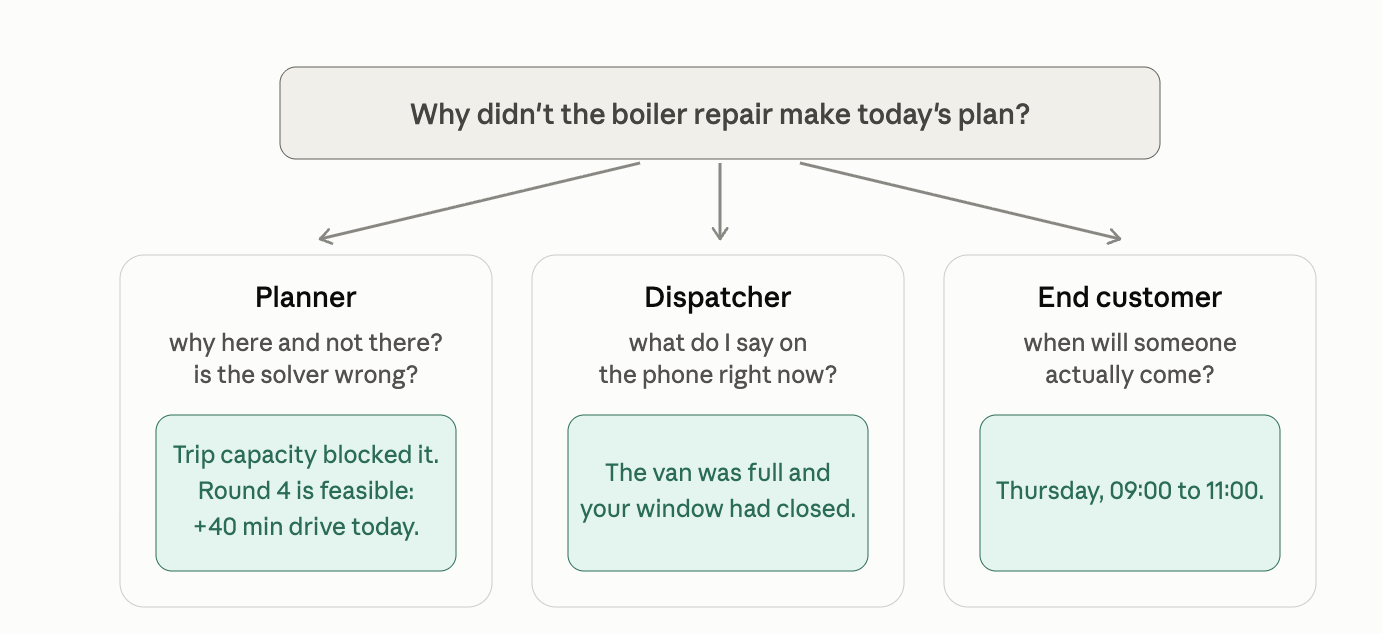
For the planner, the delta is the whole thing. Showing the blocking constraint is table stakes. What actually stops an override is showing what the alternative would cost. A planner who can see that moving the job to the round they had in mind adds 40 minutes of drive time across the day makes a different decision than one who cannot. Give them the top two or three feasible alternatives with the score impact attached, and the argument ends there.
For the agent, map the vocabulary once. Constraint codes are a stable, typed vocabulary, which means you map them to your own wording centrally, one time, and every surface in your product inherits it. Leaking an enum into a support screen is a bug.
For the end customer, resist the urge to explain. They do not need to know that a vehicle hit its capacity. They need Thursday morning. Convert the reason into the next commitment you can actually keep.
Reasons have shipped alongside the solution in our APIs since 2023, when we first made the case publicly, so the raw material is already in the response you get back.
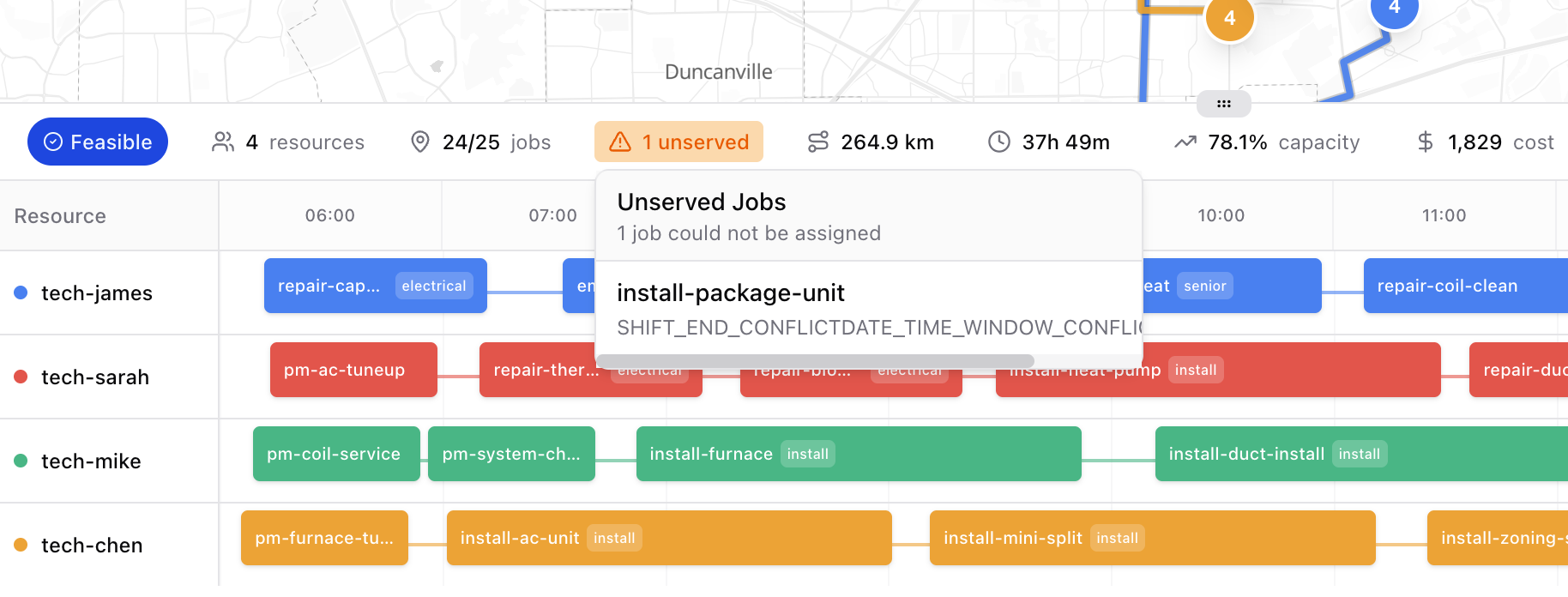
For every job the solver could not place, the VRP API returns unservedReasons, a map from the job to the hard constraints that blocked every assignment it tried.
{
  "unserved": ["job-999"],
  "unservedReasons": {
    "job-999": ["TRIP_CAPACITY", "DATE_TIME_WINDOW_CONFLICT"]
  }
}
The van was full, and the requested window did not line up with anything the schedule had left. That is enough for the dispatcher at 08:40, once you have mapped the two codes to your own wording.
The codes are not free text. They come from a fixed vocabulary, each documented with a level:
That distinction matters when you design the screen. A hard constraint is a fact you report. A soft constraint is a trade-off you can offer to change.
Shift scheduling behaves the same way. The Fill API reports the blocking hard constraints per unassigned shift:
{
  "unassigned": ["shift-2"],
  "unservedReasons": {
    "shift-2": ["Employee Skill Match"]
  }
}
A planner who learns why a job failed still has to decide what to do. The explanation endpoint answers that in the same response.
{
  "conflicts": [
    {
      "constraint": "Employee Skill Match",
      "score": "-1hard",
      "employee": "Bert",
      "shift": "1",
      "skill": "skill",
      "description": "Employee lacks a required skill for the shift"
    }
  ],
  "unresolved": [
    { "constraint": "Minimum Rest", "score": "-2hard" }
  ],
  "alternatives": {
    "1": [
      {
        "shift": "1",
        "employee": "John",
        "score": { "hardScore": 0, "softScore": 0, "feasible": true },
        "violations": []
      }
    ]
  }
}
A named person, a named constraint, the scored impact, and a ranked alternative that would have worked. That is the raw material for the planner screen described above.
Two more endpoints cover the questions that follow:
POST /v2/vrp/evaluate scores a plan without re-solving it. Feed it the routes a human built and get the same score breakdown and violations back. Useful when a planner insists their version is better: now you can both look at the number.
POST /v2/vrp/suggest takes one new job and returns the best position for it in an existing plan, with the score impact attached. One job, one answer, no full re-solve. This is the endpoint behind a good "where can I fit this?" interaction.
This is the part most teams never build, and it is the highest-value use of the data.
Log the reasons. Look at the distribution across a month rather than a day. An unassigned job is an operational event; a pattern in unassigned jobs is a product signal.
TAG_HARD dominating usually means your skill or certification data is stale, not that you are short of qualified peopleTRIP_CAPACITY dominating usually means the vehicle model is wrong, or the wrong vehicles are on the wrong roundsDATE_TIME_WINDOW_CONFLICT dominating often means sales is promising windows operations cannot serveSHIFT_END_CONFLICT or MAX_DRIVE_TIME clustering in one region usually means the territory is drawn too wideMost teams read an unassigned job as "the day was full." More often it is a modeling defect that has been quietly costing capacity for months.
Explanation is heavy on computer, and it is worth designing around that.
After the solver settles on its best plan, a hyper-local discovery phase walks the alternative assignments for each decision, scores every one against the full constraint set, and ranks them. That work grows sharply with problem size, which is why it is opt-in per request through options.explanation.enabled.
The practical rule: turn it on where a human is waiting for an answer, scope it to the failures where you can, and leave it off for bulk overnight runs nobody will read.
The good new: Our V3 solver lands later in 2026 with a step change in solve time at equal or better solution quality. As a result, the explanation you could previously only afford occasionally will become something you can return on the solve a dispatcher is waiting on. The design question stops being whether you can afford to explain and becomes which of the three audiences is asking.
The platforms that get this right are not the ones with the best solver. They are the ones whose planners stopped fighting it.
The explainability documentation is at docs.solvice.io and the endpoints are open to any API key. If you want to work through what that 08:40 screen should say in your product, we are happy to go through your constraint model with you.
.png)