.png)
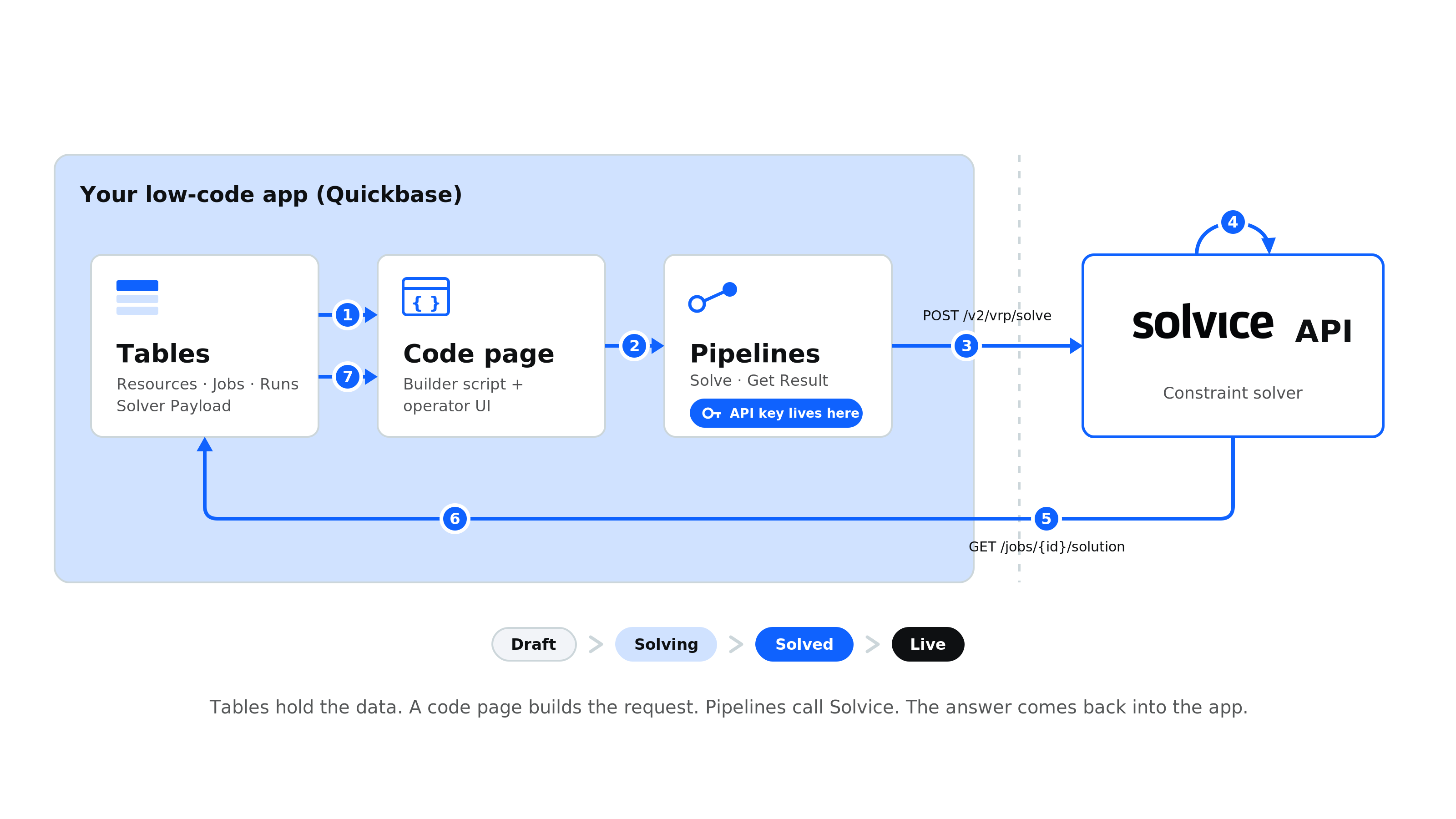
The Quickbase holy trinity of Tables, Pipelines, and a Code page maps cleanly onto a route optimization integration: your data and the API payload live in tables, a code page assembles the request and is the operator interface, and Pipelines automate the round trip to the Solvice API. Part one walks the architecture; part two shows what you can build on top, from swim lanes and route maps to drag-and-drop and suggested insertion points. The same three parts already run both a routing scheduler and a shift-filling board.
.png)
If your business runs on a low-code app, you already hold the two things a routing or scheduling optimizer needs: the people or vehicles to plan, and the jobs to be done. What the platform does not give you is the optimizer itself. You do not need it to. You can connect your app directly to the Solvice API and let a purpose-built solver do the planning, while everything else stays in the platform you control.
The clean way to think about it, in Quickbase terms, is a holy trinity: Tables, Pipelines, and a Code page. Those three building blocks map almost one to one onto what an optimization integration needs, and they connect to the Solvice API without anything exotic in between. This piece walks that architecture in principle, then shows what you can build on top of it in practice. We use Quickbase as the worked example, but the shape holds on any low-code platform that stores tables and can make an outbound HTTP call.
Wire those three to the Solvice API and you have a working optimizer inside your app.
Start from what you already have. In a Quickbase app the resources (your people or vehicles, with their availability) and the jobs (the work to be done, with time windows and requirements) already live in tables. That is the raw material of every optimization run.
You add a couple of tables to support the process. A Runs table makes each optimization a record with a status, so a run moves through Draft, Solving, Solved, and Live, and you can keep it, review it, and compare it against earlier runs. A small helper table holds the assembled payload, ready to send.
The payload is built from those tables by a small builder script. Formula fields can pre-shape individual values inside a row, but assembling a list of nested objects, a route with many stops, or a person with many availability windows, is the kind of thing a short script does cleanly and a formula cannot. So the honest division is simple: the tables hold the data, and a compact script turns the rows into the JSON. It produces three blocks:
Because the payload is built from the tables on every run, it always reflects the current data. Change an availability or add a job, and the next run picks it up.
A Quickbase code page is a real HTML, CSS, and JavaScript page hosted inside the app. In this architecture it has two jobs.
First, it builds the request. When an operator asks for a plan, the builder script on the page reads the rows from the tables, assembles them into one payload, writes it to the helper record, and flips a Solve trigger on a new Run. Second, it is the user interface to the whole process: the screen the operator works in, from starting a run to reading the result.
One rule keeps this safe. The code page never calls Solvice directly. Anyone who opens a page can read its source, so the API key must not live there. The page prepares the request and hands off to the Pipelines, which hold the secret.
Pipelines are Quickbase's automation layer, the part that can talk to the outside world. Two of them carry the integration.
A Solve pipeline fires when the code page flips the trigger. It reads the assembled payload, posts it to Solvice, stores the returned job id on the Run, and sets the status to Solving. A Get Result pipeline retrieves the solution once it is ready and writes the whole thing into a single Solution JSON field on the Run, then sets the status to Solved.
The Solvice API key lives only inside these Pipelines, as an HTTP header. The platform holds it server-side, so you get a secure integration without running a server of your own.
The endpoints are straightforward:
POST https://api.solvice.io/v2/vrp/solve            (returns a job id)
GET  https://api.solvice.io/v2/vrp/jobs/{id}/solution   (poll until solved)
Solvice solves asynchronously, because a large plan takes seconds to minutes: the POST returns immediately and the solver keeps working in the background, which is why the second pipeline fetches the result separately. For small, interactive problems there is a synchronous endpoint, POST /v2/vrp/solve/sync, that returns the answer directly and skips the wait.
Put the trinity together and the flow is a clean loop:
Tables, code page, Pipelines. Each does one part, and together they integrate with the Solvice API seamlessly.
The loop is the plumbing. The reason to build it is what the code page puts on top. Because the solution comes back as structured data in a table, and the page is yours to design, the interface can be as simple or as rich as the operation needs. It is also not read-only: the same page where you view the plan is where you adjust it.
At the simple end, a swim-lane view: one lane per resource, the assigned jobs laid out along the day in order, with arrival times.
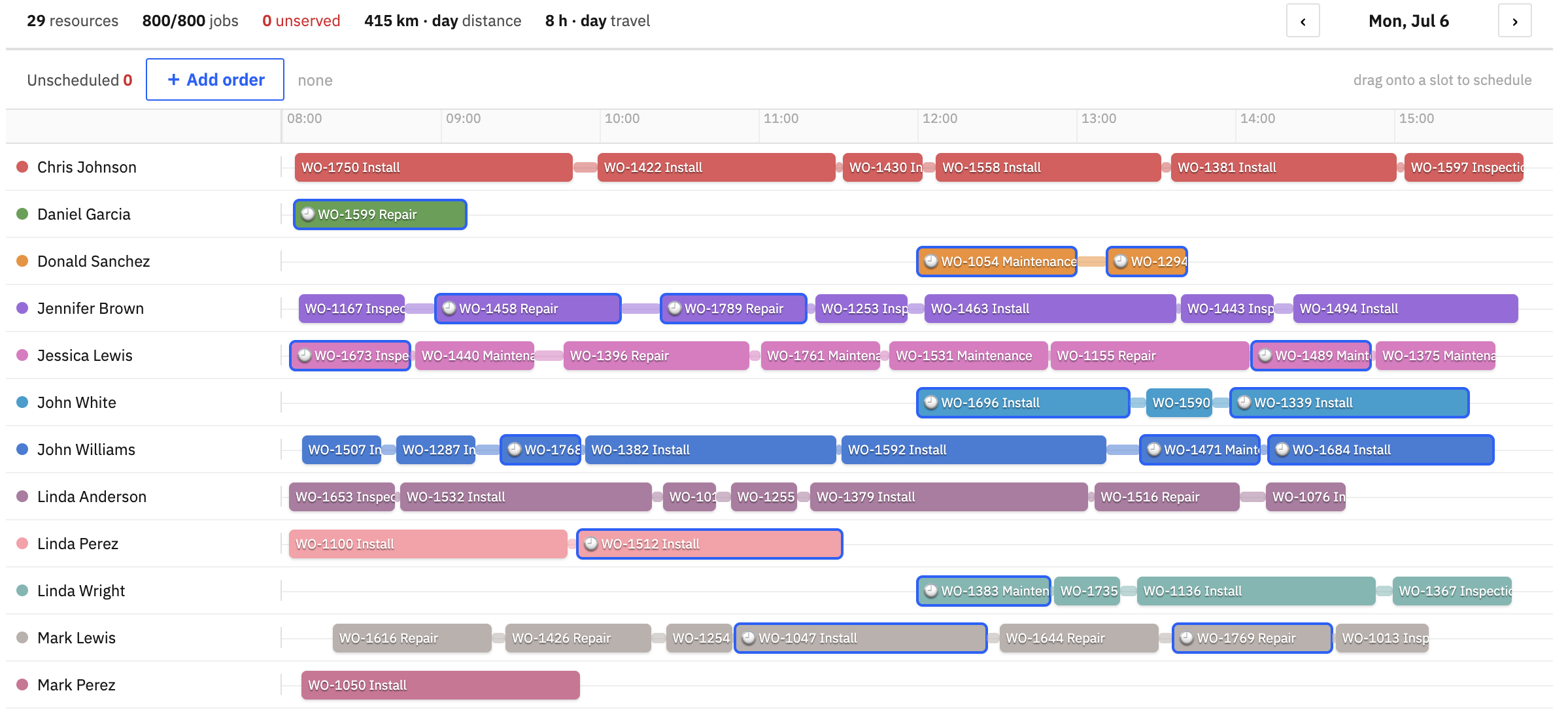
For routing, a map: each resource's route drawn as a sequence of stops, so a dispatcher sees the shape of the day at a glance.
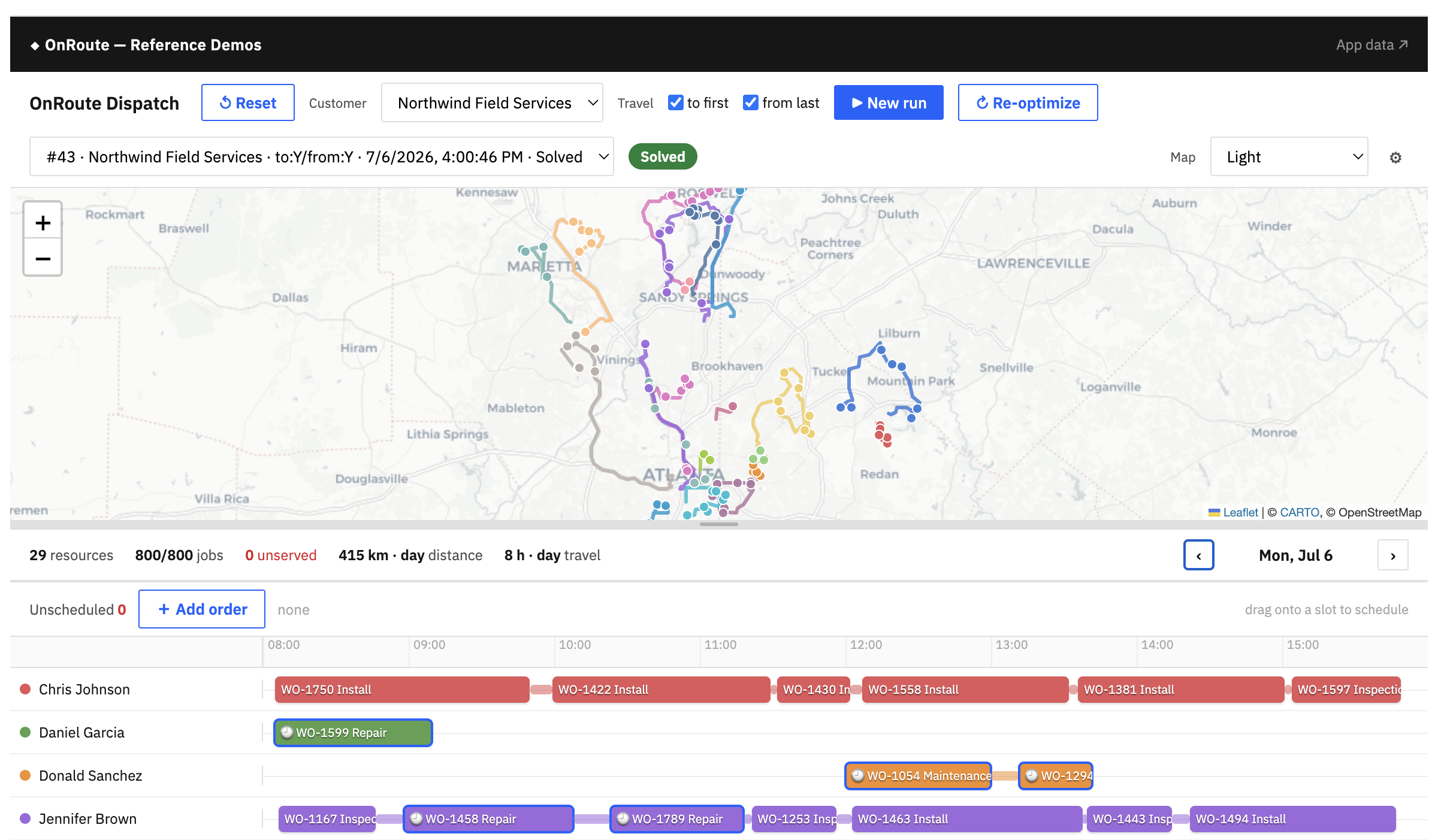
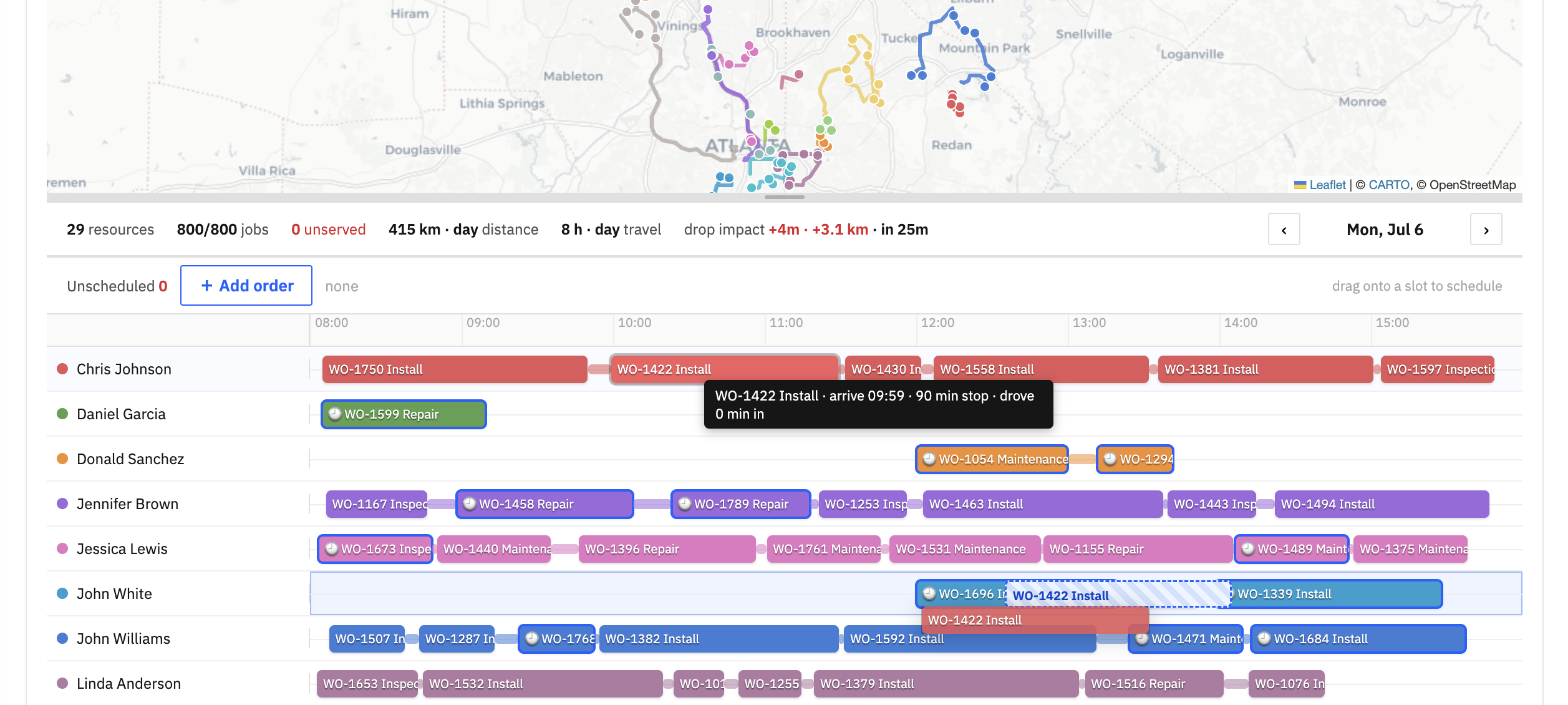
And then the features that make operators trust the tool and keep control of it. Drag-and-drop to move a job from one resource to another, with the plan updating around it. Suggested insertion points when a new order arrives mid-day, so the system proposes where it fits best instead of forcing a full re-plan. A promote-to-live step to commit the chosen run. These are exactly the interactive, in-the-day decisions that Solvice endpoints such as Suggest and the synchronous solve are built to answer, surfaced in an interface your own team designed.
None of this is theoretical. We have built the same trinity for different problems: a route optimization scheduler that plans vehicles and stops, and a shift-filling board that backfills absent workers from a substitute pool. Both are Quickbase Tables plus Pipelines plus a code page, both talk to the Solvice API, and both run the same Draft to Solving to Solved to Live loop. The problem changes. The three building blocks do not.
Free download: the build brief. We turned this into a complete, hand-it-to-an-AI build brief: the tables to create, the builder script, the two Pipelines, the code page, and the gotchas that save hours, for both routing and scheduling.
And the front end? That part doesn't have to be rocket science either. A dispatch view is a solved design problem: a map, a timeline, drag-and-drop to reassign, and live feedback when a planner moves something.
To save you from building it from scratch, we packaged that knowledge into the Solvice scheduler plugin, an open-source (MIT) Claude Code plugin available on GitHub. (link to the plugin here)
Run /scheduler and it walks you through a short discovery, proposes an architecture in your own domain language (work orders and technicians, not generic jobs and resources), then generates a runnable scheduler UI in React, Vue, Angular, or plain TypeScript, wired to the same Solvice endpoints described above. It even handles the unglamorous details, like distance matrices for instant drag previews and polling for async solves, so your build ends where it should: at a working screen your planners actually use.
If you already run your operation in Quickbase or a similar platform, you are most of the way there. The data is in your tables. What is left is building the payload from those tables, wiring the two Pipelines to the Solvice API, and building the code page your operators will use. Read the VRP API reference for the full request and constraint model, or talk to us and we will help your team stand up the first run.